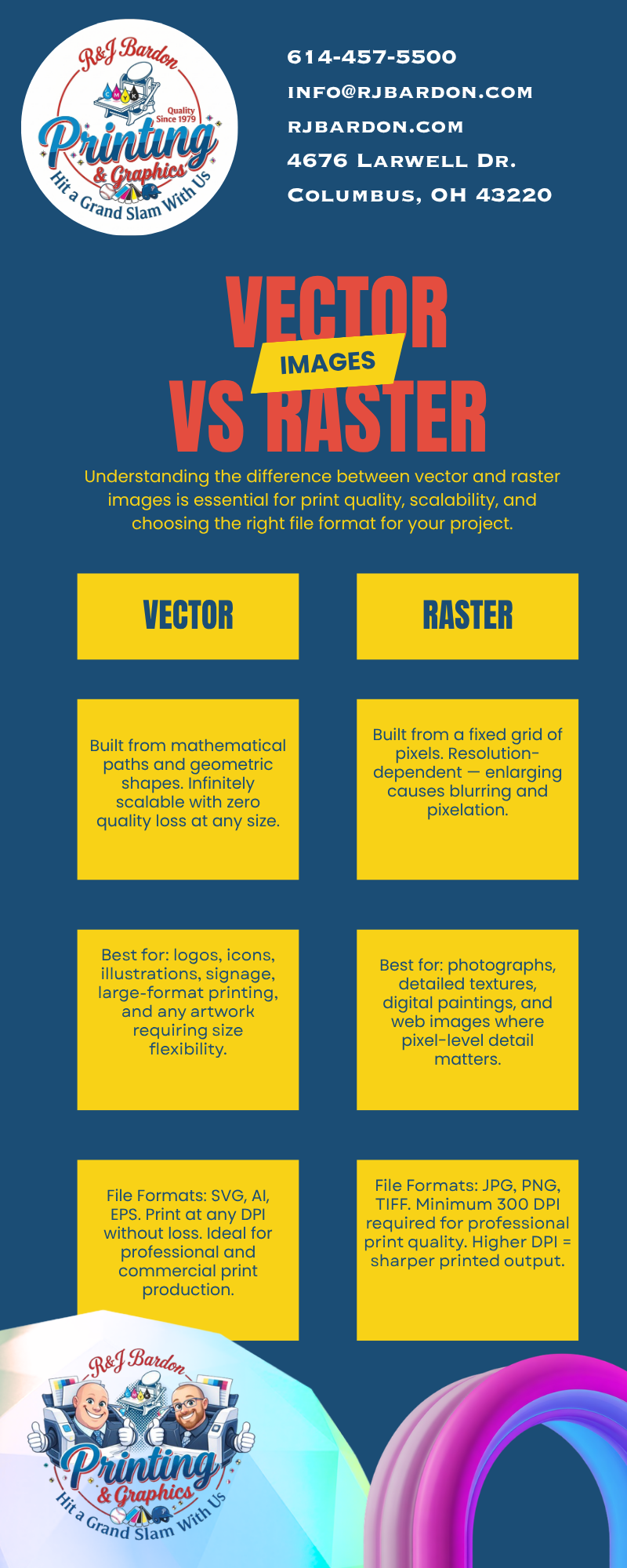
When it comes to professional printing, not all artwork is created equal. One of the most common issues we see is customers providing artwork that looks great on a phone or computer but becomes blurry or pixelated when printed.
Understanding the difference between vector and raster images can save time, improve print quality, and help you get the best results for your project.
What Is a Vector Image?
Vector artwork is digital artwork created using mathematical formulas instead of pixels. It consists of points, lines, curves, and shapes that can be resized infinitely without losing quality.
Unlike photographs, vector graphics remain perfectly sharp whether they’re printed on a business card, a banner, a billboard, or a vehicle wrap.
Common vector file formats include:
- AI (.ai)
- EPS (.eps)
- SVG (.svg)
- PDF (when created as vector artwork)
Why Printers Prefer Vector Files
At R&J Bardon Printing & Graphics, we design and print using inches—not pixels.
While digital screens measure graphics in pixels, printing relies on physical dimensions. A logo that measures 2 inches wide today may need to be 20 feet wide tomorrow for a trade show display or building sign.
Because vector artwork is mathematically generated, it can scale to virtually any size while maintaining crisp edges and professional quality.
If you’re printing:
- Business cards
- Brochures
- Banners
- Yard signs
- Vehicle graphics
- Trade show displays
- Storefront signage
…vector artwork is almost always the best choice.
What Is a Raster Image?
Raster images are made up of thousands—or even millions—of tiny colored squares called pixels.
Photos taken with your phone or digital camera are raster images.
Common raster file formats include:
- JPG / JPEG
- PNG
- TIFF
- BMP
- GIF
Raster images are perfect for:
- Social media
- Websites
- Email marketing
- Digital advertisements
- Photography
However, raster images have one major limitation:
They cannot be enlarged beyond their original size without losing quality.
As you increase the size of a raster image, the individual pixels become visible, creating a blurry or blocky appearance known as pixelation.
Why Images Sometimes Look Great Online but Poor in Print
A logo that looks perfectly sharp on a smartphone may only be a few hundred pixels wide.
That same logo might need to be printed:
- 24 inches wide on a banner
- 48 inches wide on a trade show display
- 96 inches wide on a storefront sign
If the original image doesn’t contain enough resolution, it simply cannot produce a crisp print.
That’s why artwork designed only for digital use often doesn’t translate well to large-format printing.
Canva Users: Check Your Artwork Before Printing
Canva is an excellent design platform and works well for many projects. However, it’s important to remember that many images used within Canva are raster graphics.
Before exporting your design:
- Set your Canva document to the actual finished print size whenever possible.
- Zoom in to inspect photos and graphics.
- If images appear soft or blurry in Canva, they’ll likely print the same way.
- Replace low-resolution images before ordering.
Taking a few extra minutes during setup can make a significant difference in your finished product.
Be Careful Using PNG Logos
Many businesses only have their logo as a PNG file.
While PNG files support transparent backgrounds and work well online, they are still raster images.
That means they may not reproduce as cleanly when printed on:
- Business cards
- Apparel
- Promotional products
- Large-format signage
- Vehicle graphics
Whenever possible, keep a true vector version of your logo on file. It will provide sharper printing, cleaner edges, and greater flexibility for future projects.
Using AI to Create Print-Ready Artwork
Artificial intelligence has become an incredible tool for creating graphics, concepts, and marketing materials.
Increasingly, our customers are utilizing platforms like ChatGPT, Google Gemini, and other AI-powered design tools daily.
AI can produce impressive artwork—but getting print-ready results depends on giving the AI clear, detailed instructions.
For the best results, include details such as:
- Finished print size (in inches)
- Desired orientation (portrait or landscape)
- High-resolution output
- Vector artwork when appropriate
- Transparent background if needed
- CMYK-friendly colors when possible
- Clean typography and scalable graphics
The more specific your prompt, the better your results will be.
Remember, AI-generated artwork isn’t always delivered as true vector files, even if it appears sharp on your screen. It’s always worth verifying the file type before sending it to print.
Need Help? We’ve Got You Covered.
Don’t worry if all of this sounds technical—that’s what we’re here for.
At R&J Bardon Printing & Graphics, we regularly help customers:
- Convert raster artwork into cleaner, print-ready files
- Recreate logos as true vector artwork
- Improve low-resolution graphics whenever possible
- Prepare artwork for large-format printing
- Optimize AI-generated artwork for professional printing
- Work with files created using ChatGPT, Google Gemini, Canva, and other AI and design platforms
Our team combines traditional graphic design expertise with today’s AI-powered tools to help produce professional results for businesses, nonprofits, schools, churches, Masonic organizations, and individuals.
Final Thoughts
Understanding the difference between vector and raster images can make all the difference between a print project that looks good and one that looks exceptional.
Vector artwork offers maximum flexibility and the highest print quality, while raster images are ideal for photography and digital marketing applications. Knowing when to use each format—and having the right files—helps ensure your project looks its best.
Ready to Print?
Whether you need help recreating a logo, improving a blurry image, preparing AI-generated artwork, or designing something completely from scratch, our team is here to help.
Contact R&J Bardon Printing & Graphics today to discuss your next project. We’ll help ensure your artwork is print-ready, professional, and designed to make a lasting impression.